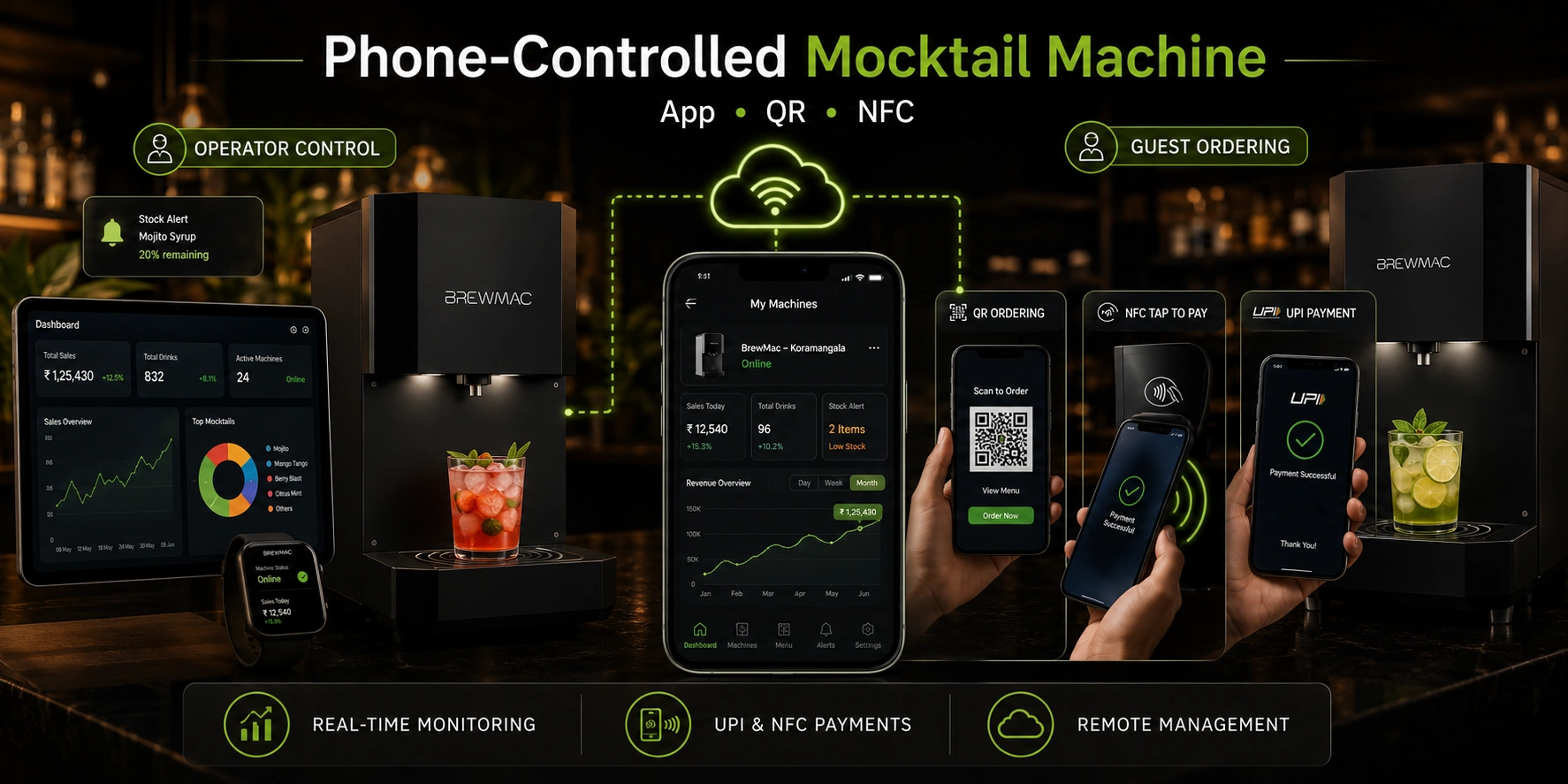
The best mocktail machine operator is one who never has to be at the machine to manage it. Phone control — done right — makes that possible.
A phone-controlled mocktail machine lets the operator manage stock levels, monitor revenue, update recipes, and receive maintenance alerts from a smartphone — without being physically present at the machine. For venue operators across India, this is not a convenience feature. It is the operational model that makes a single machine deployable without dedicated on-site staff, and a franchise fleet manageable from one device.
There are two distinct types of phone control on a mocktail vending machine: operator-side control (you managing the machine remotely) and guest-side control (your customer ordering and paying via their phone). Both matter. Both work differently. This guide covers both.
What Does Phone Control Actually Mean on a Mocktail Machine?
Phone control on a mocktail machine covers two separate functions that are often confused:
- Operator control — The venue owner or franchise investor uses a phone or tablet to monitor stock, view revenue data, update recipes, receive maintenance alerts, and manage machine settings — remotely, from anywhere.
- Guest control — The customer uses their own phone to browse the menu, place an order, and pay — via QR code, NFC tap, or UPI — without needing to interact with a staff member.
These are powered by different technologies and serve different purposes. Operator control requires IoT or cloud connectivity. Guest control requires QR code integration, NFC payment support, or UPI payment gateway — all of which are built into the RollingFizz system.
Every Phone Control Method: How Each One Works
Here is every method by which a phone interacts with a RollingFizz mocktail machine — operator-side and guest-side:
| Control Method | How It Works | Range | Best For | RollingFizz Support |
| Touchscreen (on-machine) | Guest selects directly on the HD touchscreen panel | On-machine only | Guest self-service — café, hotel, gym, mall | Yes — all models |
| Phone app (Bluetooth) | Operator controls machine via Bluetooth app on smartphone | 10m radius only | Home use, personal setups | Classic (home model) |
| Phone app (IoT/cloud) | Operator manages machine remotely via cloud-connected app from anywhere | Anywhere with internet | Single commercial venue, remote monitoring | Pro, Trolley, Grand |
| Cloud dashboard (browser) | Full fleet management via web browser — any device, any location | Anywhere with internet | Multi-location operators, franchise fleets | Pro, Grand, fleet |
| QR code ordering (guest-facing) | Guest scans QR on phone, selects and pays via browser — no app required | On-premises only | Events, contactless guest ordering | Trolley, Grand |
| NFC tap (guest-facing payment) | Guest taps phone or card to pay — machine handles selection on touchscreen | Physical tap range | High-volume fast service — mall, airport, gym | All models |
Operator Phone Control: What You Can Manage Remotely
For venue operators and franchise investors, remote phone control via the RollingFizz cloud app is the daily management interface. Here is every function accessible from a phone without being physically present at the machine:
Real-time stock monitoring
The cloud dashboard shows live ingredient levels per syrup — updated after every pour. When any ingredient reaches the 20% threshold, a push notification goes to the operator’s phone automatically. Restocking is always planned, never reactive.
Live revenue tracking
Every transaction is logged instantly — drink type, time, payment method, amount. The operator views daily, weekly, and monthly revenue from the phone dashboard. No manual till reconciliation. No end-of-day paperwork. The data is always current and always accessible.
Recipe and menu management
Seasonal menu changes, new drink additions, or price adjustments are pushed to the machine remotely from the cloud app. For franchise operators managing multiple machines, a single update deploys to every unit simultaneously — no site visits required.
Maintenance alerts
Calibration drift, carbonation pressure drops, connectivity interruptions, and scheduled service reminders all push to the operator’s phone automatically. The RollingFizz service team receives the same alerts simultaneously — so technical issues are flagged and actioned before the operator even needs to respond.
Machine on/off and trading hour management
The machine’s active trading hours can be set and adjusted remotely from the phone dashboard. Temporary deactivation for restocking, cleaning, or maintenance is managed without a site visit.
Guest Phone Control: How Customers Order and Pay from Their Phone
Guest-facing phone control removes the last friction point in the mocktail machine experience — the need to physically interact with the machine’s touchscreen. For events, high-footfall venues, and contactless-first settings, it matters.
QR code ordering — guest-facing phone control
A QR code displayed on or near the RollingFizz machine opens the drink menu directly in the guest’s phone browser — no app download required. The guest browses the menu, selects their drink, and pays via UPI. The machine receives the order and dispenses the mocktail. Ideal for events, weddings, and corporate functions where guests prefer phone-first interactions.
NFC tap payment — contactless phone payment
Guests tap their phone or contactless card against the machine’s NFC payment terminal after selecting their drink on the touchscreen. Payment clears in under two seconds. No cash. No app required. For high-volume settings — malls, gyms, hospitals, airports — NFC payment reduces queue time significantly.
UPI payment integration
UPI is the primary digital payment method in India, used by over 500 million people. Every RollingFizz machine accepts UPI payment directly — guests scan the UPI QR displayed on the machine screen and complete payment in their banking app. No card required. No third-party app required. The machine confirms payment receipt and dispenses the drink automatically.
Who Controls What: Operator vs Guest on a RollingFizz Machine
Here is the complete breakdown of which functions are operator-controlled and which are guest-controlled — and how each is accessed:
| Function | Controlled By | How |
| Stock level monitoring | Operator | Real-time — cloud dashboard or app |
| Revenue reporting | Operator | Per drink, per day, per machine — cloud |
| Recipe and menu updates | Operator | Remote — cloud deployment to machine |
| Machine on/off and trading hours | Operator | Remote — cloud or app |
| Maintenance alerts | Operator + service team | Automatic — cloud push notification |
| Drink selection | Guest | HD touchscreen on machine |
| Payment | Guest | UPI, NFC, contactless card — on machine |
| QR code ordering (events) | Guest | Phone browser — no app required |
| Order history / repeat order | Guest (future feature) | App or QR — venue-dependent |
What to Look for When Evaluating Phone Control on a Mocktail Machine
Phone control capability varies significantly across machines in the Indian market. Before committing to any mocktail machine purchase or rental arrangement, ask these five questions:
- Is operator control truly remote — or only within Bluetooth range? Bluetooth-only control means you must be physically near the machine to manage it. IoT/cloud control means genuine remote access from anywhere.
- Does the app show real-time data — or delayed summaries? A 24-hour-delayed dashboard is not the same as live monitoring. Confirm that stock alerts and revenue data update in real time, not at end of day.
- Does it support UPI and NFC payment natively — or via a third-party terminal? Integrated payment is faster and more reliable than a third-party attachment. Confirm UPI and NFC are built into the machine, not bolted on.
- Is QR code ordering supported for events? For event hire and high-footfall venues, QR-based guest ordering is a significant throughput advantage. Confirm it is supported before booking an event deployment.
- Does the cloud app support fleet management or only a single unit? If you plan to scale beyond one machine, confirm the app can manage multiple units from a single view — not one separate dashboard per machine.
For a deeper explanation of how Bluetooth, IoT, and cloud connectivity differ — and which is right for your venue — the Bluetooth vs IoT vs cloud mocktail machine comparison covers every factor.
Frequently Asked Questions
Can I control a mocktail machine from my phone?
Yes — the RollingFizz cloud app gives operators full remote control from any smartphone or tablet with an internet connection. Stock monitoring, revenue tracking, recipe updates, maintenance alerts, and machine settings are all accessible remotely. Guest-facing phone control is also supported via QR code ordering and UPI/NFC payment integration built into every machine.
Do guests need to download an app to order from a mocktail machine?
No. Guest-facing phone ordering on RollingFizz machines uses QR code links that open directly in the phone’s browser — no app download required. Payment is completed via UPI or NFC tap. This frictionless approach is designed for events, weddings, and public venues where downloading an app is not a realistic guest expectation.
What is the difference between app control and cloud control on a mocktail machine?
App control via Bluetooth requires the operator to be within physical range of the machine — typically 10 metres. Cloud control via the RollingFizz IoT system gives full remote access from anywhere with an internet connection. For commercial deployment, cloud control is the appropriate standard. App-based Bluetooth control is suitable only for home or personal use.
Can I manage multiple mocktail machines from one phone?
Yes. The RollingFizz cloud dashboard aggregates all units in a franchise or multi-location fleet into a single view — accessible from one phone or browser. Revenue, stock, and machine health data for every unit is visible simultaneously, with consolidated fleet-level reporting available alongside per-unit breakdowns.
Does UPI payment work on all RollingFizz models?
Yes. UPI payment is integrated into all RollingFizz models — Classic, Pro, Trolley, and Grand. NFC contactless payment and card payment are supported on the Pro, Trolley, and Grand models. The Classic home model supports the payment methods most relevant to personal and low-volume use.
For the complete breakdown of how RollingFizz IoT connectivity works beyond phone control — including fleet management, RFID, and cloud dashboard capabilities — see the IoT mocktail machine guide.
Manage your mocktail machine from your phone. See how.
The RollingFizz demo covers the full operator experience — cloud dashboard, phone monitoring, stock alerts, and revenue tracking — alongside the guest-facing machine and pour experience. Book a free demo and see exactly what phone control looks like on a live RollingFizz unit.

Leave a Reply
You must be logged in to post a comment.